Plugins / BragDeal Lead Manager

Lead Capture

BragDeal Lead Manager

Every form on your site writes its entries to a different place, and some write nowhere at all. Lead Manager captures every successful submission into one WordPress lead inbox, whichever plugin sent it, so nothing is scattered and nothing is lost.
  • Nine form plugins supported, including Contact Form 7, Gravity Forms, WPForms and Elementor Pro Forms
  • One searchable inbox with filters, custom columns, field mapping, trash and restore
  • Pro adds notes, action history, status workflows and follow-up dates

Nine form pluginsNo external calls14-day money-back
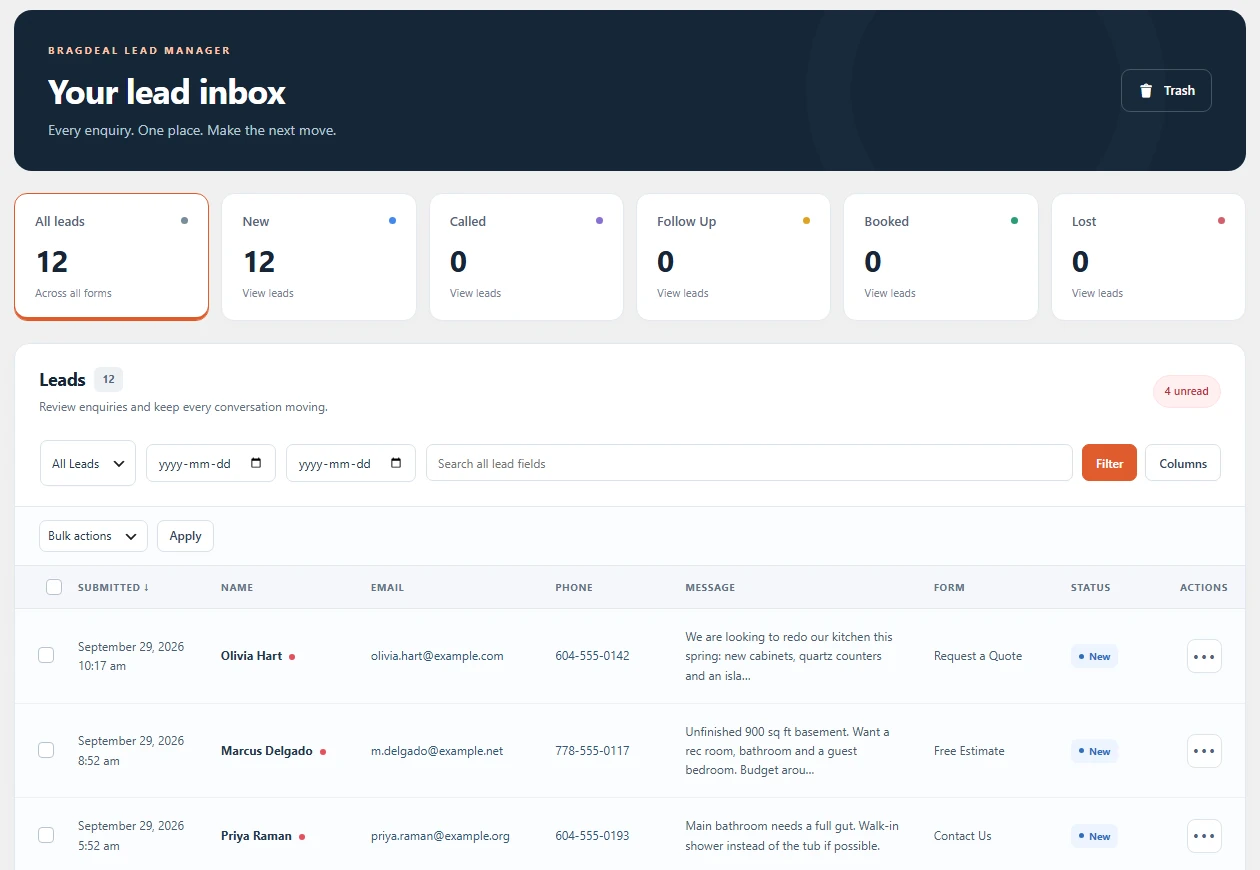
BragDeal Lead Manager lead inbox with status cards, filters and the leads table
9 form plugins
Contact Form 7, Gravity Forms, WPForms, Fluent Forms, Forminator, Formidable Forms, Ninja Forms, MetForm and Elementor Pro Forms
1 inbox
Every submission in one place, searchable and filterable, whichever plugin sent it
0 external calls
Your leads stay in your own database. Nothing is sent anywhere else
Full history
Notes, status changes and dates recorded against each lead with Pro
Features

Capture everything, then actually follow it up

Every lead, with its original
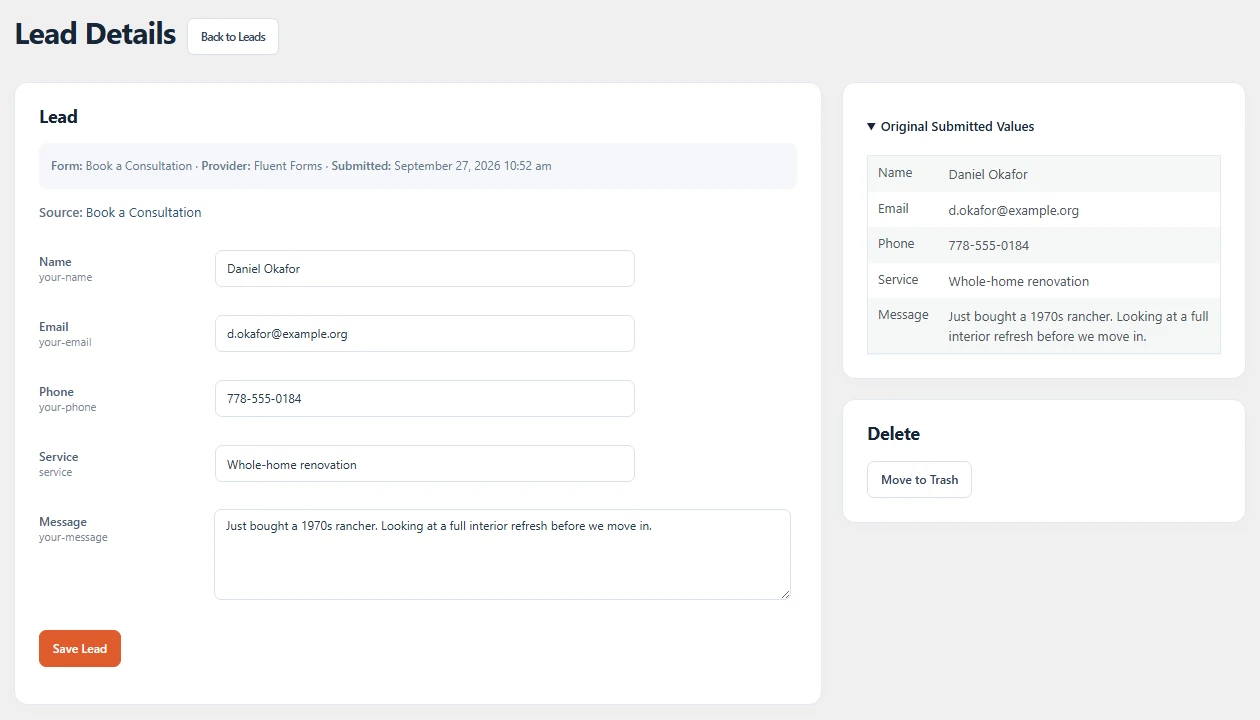
Open any lead to correct its working fields. The values the visitor actually submitted are kept alongside as an unchangeable original, so a fix never loses what was sent.
Lead Details screen with editable fields and the original submitted values
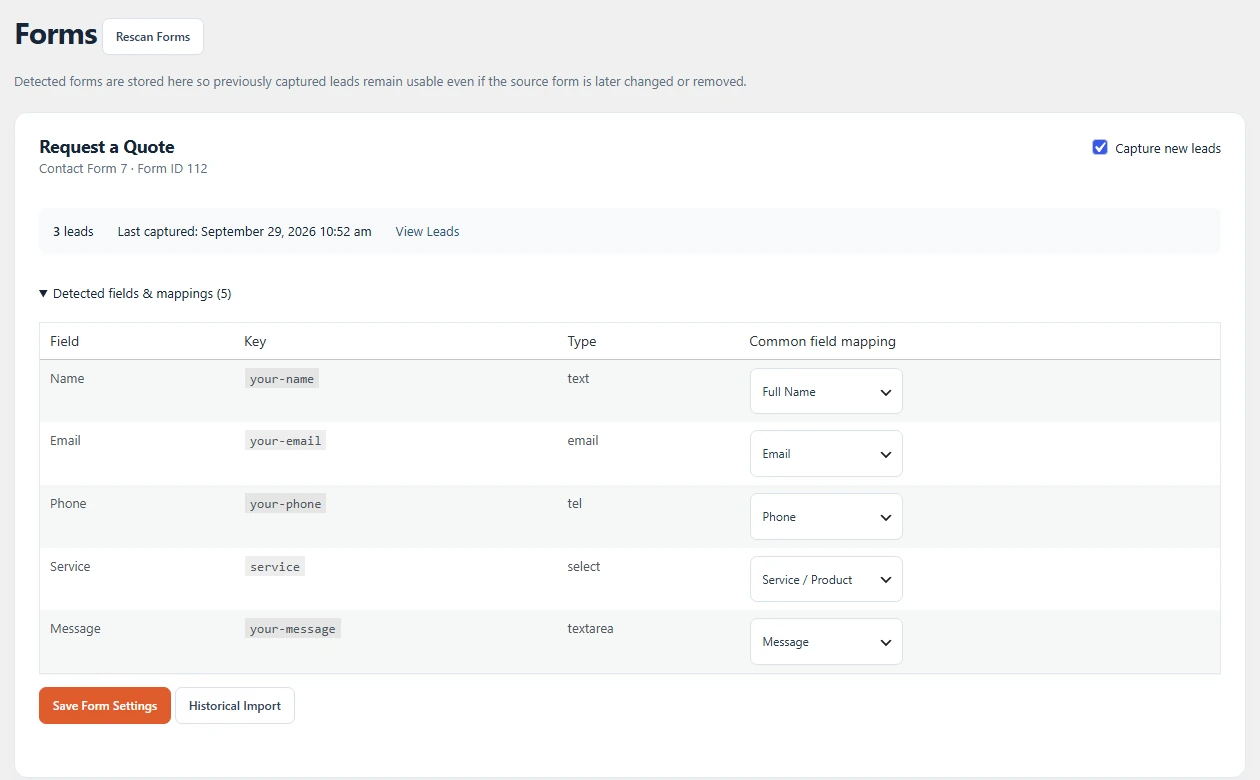
Forms screen showing detected fields and common field mappings

Map your fields once

Lead Manager lists every detected form with its source plugin, lead count and last capture. Point each field at name, email, phone or message once, or switch capture off for a single form.

Every action in one menu

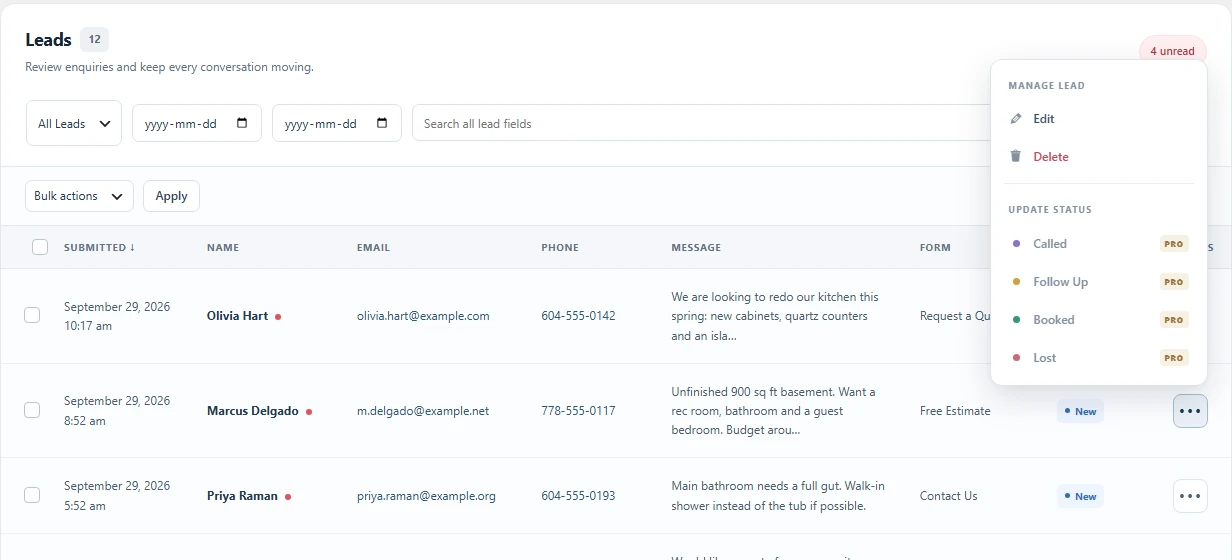
Each lead has a single menu. Edit and Delete sit apart from the status actions, and with Pro the Called, Follow Up, Booked and Lost statuses are one click away.
Lead table with the action menu open showing Edit, Delete and status actions
One inbox for every form
Lead Manager listens to the success event of each supported form plugin and writes the submission into a single leads screen. No shortcodes, no rebuilding your forms, no second dashboard to check.
Search, filter and sort
Search by name, email, phone or message. Filter by status and date. Choose which fields become columns so the list shows what your team actually needs.
Field mapping
Point each form’s fields at name, email, phone and message once, and every future submission lands in the right column, even when two forms label the same field differently.
Historical imports
Already collecting entries in Gravity Forms, WPForms, Fluent Forms, Forminator or Formidable Forms? Import what those plugins have stored so your inbox starts full instead of empty.
Trash, restore and roles
Leads go to trash rather than disappearing, and can be restored. Choose which roles may view, edit or delete leads so the right people see the right records.
Privacy built in
Leads are included in WordPress personal data export and erasure requests, and the plugin makes no external calls. Nothing about your leads leaves your server.
Supported forms

Nine form plugins, no configuration

Install Lead Manager and it starts capturing from whichever of these you already run. Nothing to add to the form itself.
Contact Form 7Native
Gravity FormsNative + import
WPFormsNative + import
Fluent FormsNative + import
ForminatorNative + import
Formidable FormsNative + import
Ninja FormsNative
MetFormNative
Elementor Pro FormsNative
Pro

Turn the inbox into a pipeline

The free plugin collects your leads. Pro is what you use to work them.
Notes and action historyPro
Write an internal note against a lead and every status change, date and note is recorded in a running history, so anyone picking the lead up can see what already happened.
Status workflowsPro
Move a lead through Called, Follow Up, Booked and Lost. Record a lost reason and a status note so a cold lead still tells you something useful.
Follow-up and booking datesPro
Set the date you promised to call back and the date the job is booked for. Overdue follow-ups are flagged in the list so nothing quietly slips.
Bulk status changesPro
Select many leads and move them all at once, for when a campaign lands and fifty enquiries need the same first action.
CRM date columnsPro
Follow-up and booking dates appear as sortable columns in the leads list, so your next call is always at the top.
Updates and supportPro
Pro updates arrive through the normal WordPress updates screen, and licensed customers get a reply within one business day.
Free vs Pro

What the free plugin does, and what Pro adds

The free BragDeal Lead Manager plugin is complete on its own and stays free. Pro is a separate paid add-on that runs alongside it.

Free plugin

WordPress.org, no account

  • Unlimited capture from nine form plugins into one inbox
  • Search, status and date filters, and pagination
  • Per-user custom columns and field mapping
  • Basic lead editing, with the original submission always kept
  • Unread alerts
  • Trash and restore, role access and per-form capture controls
  • Historical import for Gravity Forms, WPForms (where its API allows), Fluent Forms, Forminator and Formidable Forms, skipping duplicates
  • WordPress personal data export and erasure
  • No external calls

Pro add-on

Paid, requires the free plugin

  • Internal notes and action history
  • Called, Follow Up, Booked and Lost workflows
  • Follow-up and booking dates with overdue indicators
  • Lost reasons and status notes
  • Bulk status changes and CRM date columns
  • License tab, updates and priority support
Pricing

Start free. Add Pro when you need it.

Pro is a separate add-on. Install it alongside the free plugin.

14-day money-back guarantee. If your subscription ends, the free plugin keeps working exactly as before. The Pro add-on’s extra features pause until you resubscribe. Your settings and data are kept.

Prices in CAD, plus tax where applicable.

Free
Forever, no account needed
$0forever
  • Capture from nine form plugins into one inbox
  • Search, filters, custom columns and field mapping
  • Trash, restore, role access and historical imports
  • Free forever, no account needed
  • Community support
Download Free
FAQ

Lead Manager questions

Do I have to change my forms?+

No. Lead Manager hooks into the success event each supported form plugin already fires, so your existing forms keep working exactly as they are. There is nothing to add to the form and no shortcode to place.

What happens to the entries my form plugin already stored?+

Gravity Forms, WPForms, Fluent Forms, Forminator and Formidable Forms entries can be imported, so your inbox starts with the history you already have instead of only new submissions.

Does Lead Manager send my leads anywhere?+

Never. Every lead is stored in your own WordPress database and the plugin makes no external calls. Leads are also covered by WordPress personal data export and erasure requests.

What do I need for the Pro add-on?+

Pro is a separate add-on that runs alongside the free plugin, so keep both installed and active. It needs the free BragDeal Lead Manager plugin installed and active. Paste your key into the License screen and the CRM tools unlock instantly.

What happens if my subscription ends?+

If your subscription ends, the free plugin keeps working exactly as before. The Pro add-on’s extra features pause until you resubscribe. Your settings and data are kept. The CRM tools lock, but nothing is deleted: your leads, notes, statuses and dates are preserved and existing notes stay readable.

Ready when you are

Start collecting every lead today, free

Install BragDeal Lead Manager from WordPress.org and your next form submission lands in the inbox. Add Pro when you want notes, statuses and follow-up dates on top.